What are skills and how do they work?
So you’ve been using Claude Code and it’s been helpful. You’ve asked it questions, had it help you write things, maybe even built a small project together. But if you have to do the same task every so often, you either have to leave the same Claude Code session running forever or you have to start from scratch with a new session and re-establish all that context.
It’s like having a great assistant who gets amnesia at the end of every workday.
What if you could teach Claude your specific workflows once, and have it remember them forever? What if instead of a general assistant, you had one that knew exactly how you work?
That’s what skills do.
What are skills?
Skills are reusable instructions that Claude Code can follow. Think of them like SOPs (standard operating procedures) for your AI assistant. You write down how you want something done, and Claude can reference those instructions whenever that type of task comes up.
Here’s what makes skills different from just prompting Claude:
They persist. Once you create a skill, it’s always available. It lives either in your particular project folder or globally on your computer or Claude.ai account, which means you don’t have to re-explain your process every time.
They can include supporting files. A skill isn’t just a prompt. Yes, there’s a main SKILL.md file, but skills can also include templates, reference documents, even scripts that actually do things.
Claude can use them automatically. You can set up skills so that Claude recognizes when they’re relevant and offers to use them, without you having to remember to ask.
The simplest way to think about it is that pure prompting is like giving someone verbal instructions. A skill is like handing them a written procedure they can follow every time.
Better web designs with the frontend-design skill
Let me show you what skills can do with a straightforward before and after example.
Claude Code ships with a built-in skill called frontend-design. It’s designed to help create more polished, distinctive web interfaces as opposed to the the generic-looking, “purple gradient designs” that LLMs tend to produce.
I gave Claude this prompt:
Create a landing page for TaskFlow, a project management tool. Include a hero section, 3 features, and a CTA.
Here’s what I get without the frontend-design skill:
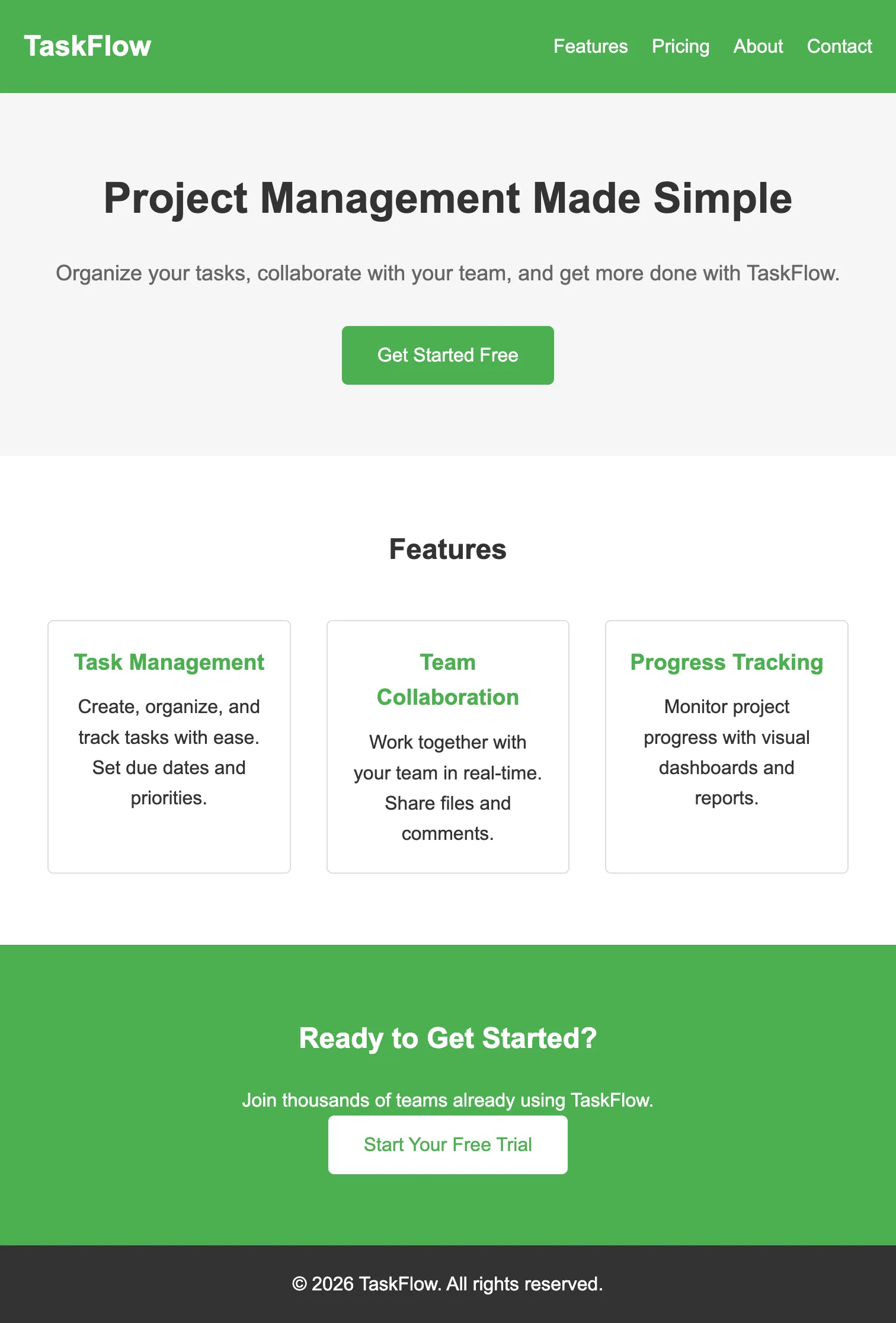
It works. The HTML is valid. But it looks like…every other AI-generated landing page you’ve ever seen. Generic, safe, and mostly forgettable.
Now here’s the same prompt with the frontend-design skill:
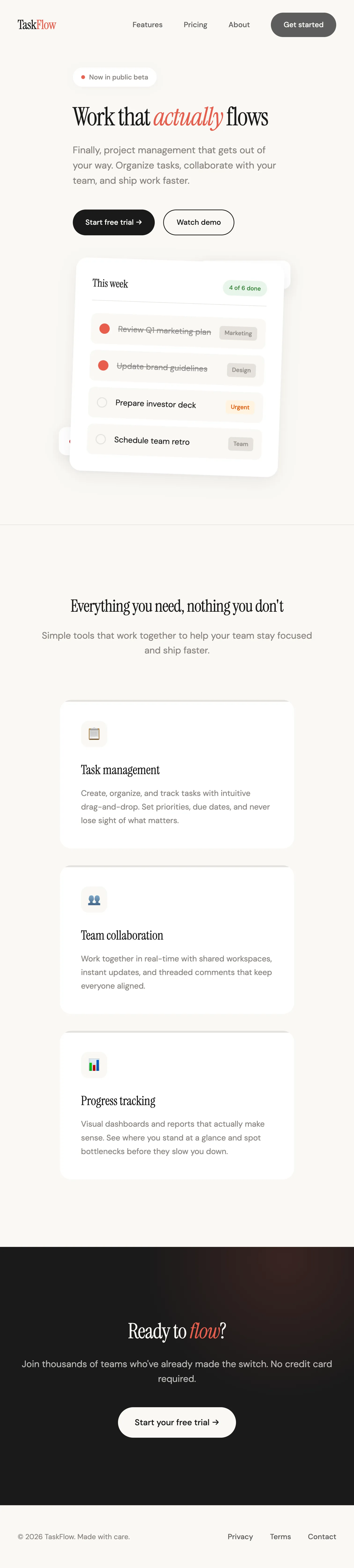
Same request, dramatically different result. The skill gives Claude specific guidance on typography, spacing, color choices, and design patterns that make the output feel more intentional.
The skill didn’t make me a designer, but it did give Claude better instructions about what good design looks like.
Teaching Claude to send email broadcasts
Let me show you a skill I built for my own workflow.
Every time I publish a blog post (on this very site!), I need to send an email to my subscribers letting them know. The process used to look like this:
- Finish writing the post
- Open Kit.com (my email platform)
- Create a new broadcast
- Write a subject line
- Summarize the post in a few bullet points
- Add the link
- Schedule it to send
It’s not complicated, but it’s just enough friction that I’d sometimes skip it. I’d publish a post and then…forget to email anyone about it. Or I’d tell myself I’d do it later and never get around to it.
So I built a skill to handle it.
Now my workflow looks like this:
- Finish writing the post
- Tell Claude “great job shipping the post! now we need to create a /kit-broadcast to send it out Wednesday at 10am”
- Review the draft Claude generates
- Approve the send schedule time and ship it off
That’s it. Claude reads the post, extracts the key points, formats the email using my template, and schedules it through the Kit API.
Here’s the thing that might surprise you: I built this skill using Claude Code itself. Anthropic ships a skill called skill-creator that helps you create new skills. I described what I wanted, and Claude walked me through setting it up.
The whole thing took less than 30 minutes.
And now? I promote every single article I write. And it’s not because I suddenly became more disciplined.
What’s inside a skill?
While it’s true that you don’t need to know how to create skills to use them, knowing a bit about the structure can help you understand how they work.
A skill lives in a folder and contains at least one file: SKILL.md. Here’s a simplified example:
---
name: my-skill
description: Does a specific thing. Use when the user asks for X or Y.
---

# My Skill

Instructions for Claude go here.

## Steps

1. First, do this
2. Then do that
3. Finally, do this other thing
The part between the --- marks is called frontmatter. It tells Claude when this skill is relevant (and when it should be invoked). The rest is the actual instructions Claude follows.
Skills can also include:
- Reference files - templates, examples, style guides
- Scripts - code that actually does things (like my Kit skill calling the email broadcast API via a Python script)
This is what makes skills more powerful than just prompting. A prompt is just text. A skill is text plus context plus the ability to take real actions.
Skills you can install today
If you’re not ready to go off and start building your own skills, that’s ok! You don’t have to build skills from scratch to benefit from them. Other people have already created skills you can use.
For example, Corey Haines’ recent skill collection is specifically designed for marketers. The collection includes skills for:
- Landing page conversion optimization
- Copywriting
- SEO
- Analytics tracking
- Email sequences
You can find them at github.com/coreyhaines31/marketingskills (or marketing-skills.com)and installing them is as easy as cloning the repository and copying the skills into your .claude/skills/ directory. If you need some help, Claude Code can actually coach you through it!
Your turn
Think about a workflow you do repeatedly. Something you do every week or maybe even every day. And something with enough steps that you sometimes skip it, rush through it, or wish it could be done more consistently.
That’s a great candidate for a skill.
You don’t have to build it yourself (though you can, and Claude will help!) Start by exploring what’s already out there. Install one of Corey’s marketing skills. Try the built-in frontend-design skill. Get a feel for what it’s like to have Claude follow a structured process instead of improvising every time.
Once you experience the difference, you’ll start seeing skill opportunities everywhere.
If you’ve got a workflow you think would make a good skill, I’d love to hear about it. Send me an email at keanan@claudecodeformarketers.com and tell me what you’re working on.
Join our free 7-day email course and learn how to use Claude Code for your marketing work. Then, get notified when we publish new use cases and ways to stay ahead of the curve.
No spam. Unsubscribe anytime.